
Managers Pro
Manager Types
There are 4 types of manager roles on Libib Pro:
Owner
The account owner is the super-admin. They have full control over the site.
There can only be one account owner. Only the account owner can assign managers, change billing details or view the history log. When an account owner deletes their account, billing will end (no new charges will occur) and all account data is permanently removed.
Admin
An admin has full access to all collections.
| Admins Can | Admins Cannot |
|---|---|
| Access all collections | Add/edit/delete managers |
| Add/edit/delete/restore collections | Change billing |
| Lend items in all collections | Change lending settings |
| Add/edit/view/delete/restore all items | View history log |
| Add/edit/view/delete/restore all patrons | |
| Publish library on their own site | |
| Change published library options on their site | |
| Allow patron holds/checkouts on their site | |
| Set up a kiosk (both app and web) |
Manager
A manager must be manually assigned to the collections they should have access to. The manager will only be able to add/edit items in their assigned collections. Additionally, a manager's public page can only aggregate the published collections that they have access to.
| Managers Can | Managers Cannot |
|---|---|
| Access collections (explicitly granted by Account Owner) | Add/delete/restore collections |
| Edit collection names | Restore items |
| Lend items in their collections | Restore patrons |
| Add/edit/view/delete items in their collections | Add/edit/delete managers |
| Add/edit/view/delete all patrons | Change billing |
| Publish library on their own site | Change lending settings |
| Change published library options on their site | View history log |
| Allow patron holds/checkouts on their site | |
| Set up a kiosk (both app and web) |
Lender
A lender must be manually assigned to the collections they should have access to. Their role is solely for the lending of materials and management of patrons.
| Lenders Can | Lenders Cannot |
|---|---|
| Access collections (explicitly granted by Account Owner) | Anything else |
| Add/edit/view/delete all patrons | |
| Lend items in their collections |
Add Manager
Adding a manager requires an open manager slot, and submitting their information to your account.
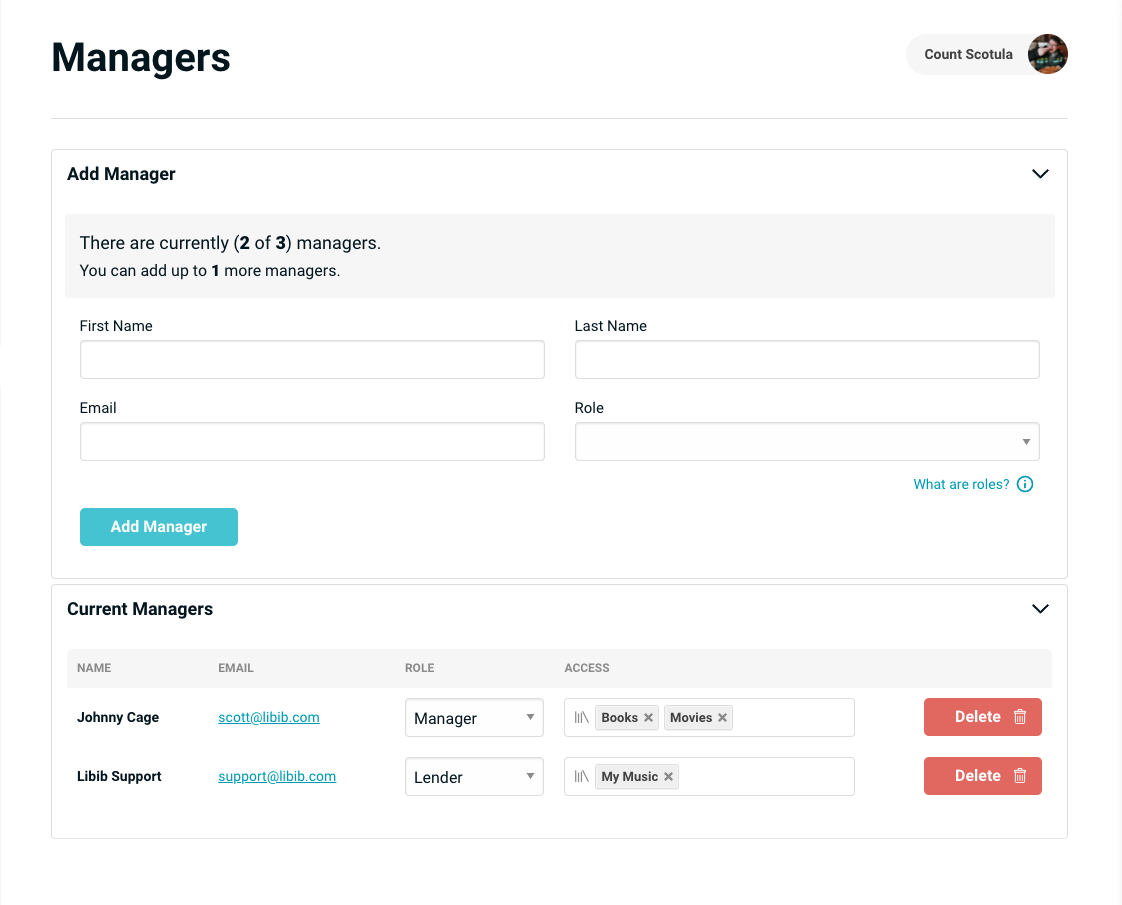
Increasing Available Manager Slots
If an account owner needs to add more managers and has no open slots available, visit Account Menu > Manage Billing to increase the max managers allowed.
Once added, they will appear in the Current Managers section. From here you can assign any collection to them as needed.
A new manager will receive a welcome email which instructs them how to login to the system.
Should a manager forget their password, or need to reset it, they can do so at:
https://www.libib.com/forgot-password
REST API
Managers can also be added through our REST API. Generally some knowledge of programming is required to use this approach.