
Publish
Site
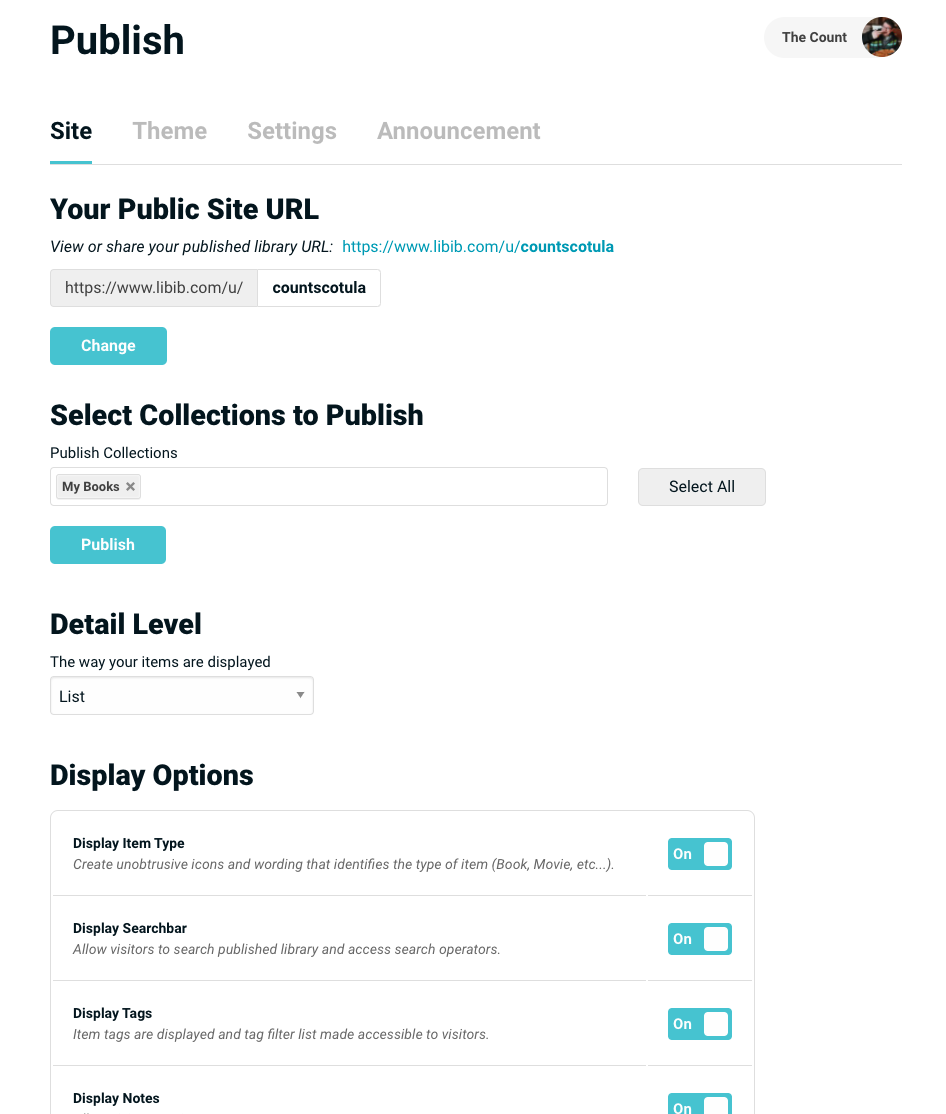
Your Public Site URL
Publishing a collection allows you to share it via a URL.
Your Public Site URL is a link to the public site – which shows all published collections.
A users' public site is accessible at https://www.libib.com/u/[alias]
Select Collections to Publish
Publish or un-publish - to your public site URL - any set of collections that you have access to.
Pro Feature
Each individual manager within an account will also have their own public site option, which offers for display only the collections that they have access to. A manager's individual public site is accessible at their own https://www.libib.com/u/[alias]
Account owners, admins, and managers have control over their individual public site settings and theme.
Detail Level Pro
Choose how the items will be shown to the public. These levels of detail mirror the options available on your own collections. You can choose summary, list, or cover.
Display Options Pro
| Option | Description |
|---|---|
| Display item type | Shows unobtrusive icons and wording that identifies the type of item (Book, Movie, etc…). |
| Display Search Bar | Lets your public site have a search input where users can run searches on your published collections. |
| Display Tags | Will toggle display of any tags that you've added to your items when viewing any item's details. For tags to also be searchable, display search bar must also be turned on. |
| Display Notes | Will toggle display of any notes that you've added to your items when viewing any item's details. For notes to also be searchable display search bar must also be turned on. |
| Display Availability | Will show a link on each item (a diverging arrow) along with a fractional number which indicates how many copies exist, and how many are checked out. |
| Display Date Added | Allows visitors to view the date the item was added to your library. |
| Display Additional Fields | Allows visitors to view your custom additional fields. This is all or nothing – setting this will display all your additional fields. |
| Display ISBN/UPC | Will toggle display of ISBN10/ISBN13/UPC numbers |
| Display Call # | Allows visitors to view your call numbers. |
| Display LCC | Will toggle display of LCC classifications. |
| Display LCCN | Will toggle display of LCCN numbers. |
| Display DDC | Will toggle display of DDC classifications. |
| Display OCLC | Will toggle display of OCLC numbers. |
| Display Lexile | Will toggle display of Lexile measurements. |
Theme Pro
Upload Logo
(Account Owner sets) Logo is displayed as a square, recommended size is 400px x 400px. The logo displays on any and all published libraries.
Website Link
(Account Owner sets) Creates a link on the published library to a specified website. The website link will show up on any and all published libraries.
Color Theme
(Account Owner sets) Define a color which the published library will use as the predominant color scheme.
Light/Dark Mode
The value mode the published library will display.
Bluesky Link
Allows you to define your Bluesky link, which will show up as an icon link on your published libraries page.
Facebook Link
Allows you to define your Facebook link, which will show up as an icon link on your published libraries page.
YouTube Link
Allows you to define your YouTube link, which will show up as an icon link on your published libraries page.
Instagram Link
Allows you to define your Instagram link, which will show up as an icon link on your published libraries page.
Settings Pro
Require Patron Login
Requires patrons to login to view the public site.
Allow Patron Holds
Will grant patrons the ability to place a hold on items in the public site. Patrons will be emailed when items become available. You can optionally disallow holds from specific collections.
Allow Patron Self-checkouts
Grants patrons the ability to checkout available items in a public site. You can optionally disallow self-checkouts from specific collections.
Patron Account Page
Allows patrons to access account management. You can optionally enable patron self-renewals and patron account editing within the patron account page
Your Email Notification for Patron Holds
Will allow you to receive an email notification when a patron places a hold.
Contact Email
Will add a button to the public site that links to a contact email of your choice.
Announcement Pro
Create an informational blurb that will be displayed to your visitors when they first land on your public site. Includes a subject and message and can be dismissed by patrons.
Patron App Ultimate
The Patron App lets visitors browse your published collections on their own device through the free Libib patron app (iOS and Android). This option is only available on Libib Ultimate, and only once the capability has been turned on at the Ultimate level.
Public Site URL required
A Public Site URL must be set before the patron app can be enabled.
Enable Patron App
Toggle this on to make the app available for your published library. Once enabled, a link and a scannable QR code appear on your published library page — patrons download the app, scan the code, and immediately get access to your published collections.
Logged-in patrons can also view their lending history, renew, self-checkout, and place holds, matching the preferences set in both Publish > Display Options and Publish > Settings. Changes to your publish settings affect both the patron app and the published site unless otherwise noted.
Disabled by the Ultimate owner
If the Ultimate Owner has turned off the Patron App capability, the tab shows a notice and it cannot be enabled here.
For a full walkthrough of what patrons can do in the app, see the Patron App guide.