
Add Collection
A collection organizes items based on a physical or logical distinction, such as location or language. For categorization, use tags instead. The key distinction is that collections represent where something belongs or how it's separated, while tags describe what something is.
A collection can consist of multiple types of item. That means any collection can contain books, board games, movies, video games, or music.
Pro Feature
Account owners and admins can add and delete collections.
Managers can not add or delete collections, though they can change the name.
Add Collection
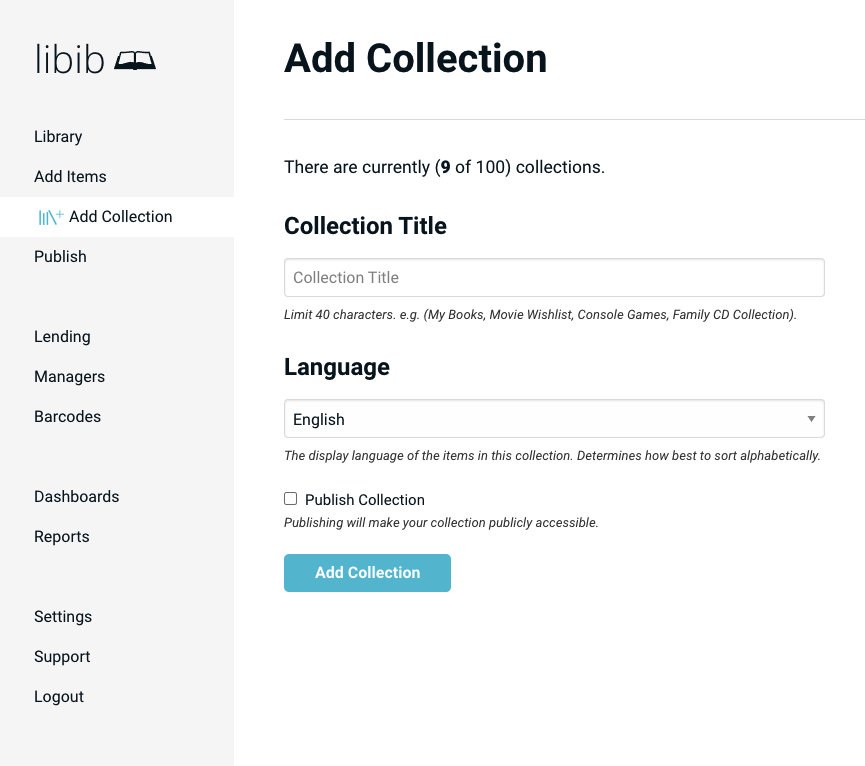
Collection Title
Choose a Collection Title. This will be the name of your collection.
Language
Choose the Language. This is used for sorting purposes and should be the primary language of most items within this collection. You cannot change this option later.
Publish Collection
Choose to Publish your collection if you want to share it with others. This option is only shown if you have created an alias in the publish section.
INFO
You can create up to 100 collections – we recommend that you limit your collections to physical locations or logical separations, and categorize them via tags. For example: "Office Library" and "Home Library" could be two separate collections.
Delete Collection
If you need to delete a collection, that is done in Settings > Collections > Delete Collections.