
Dashboard Ultimate
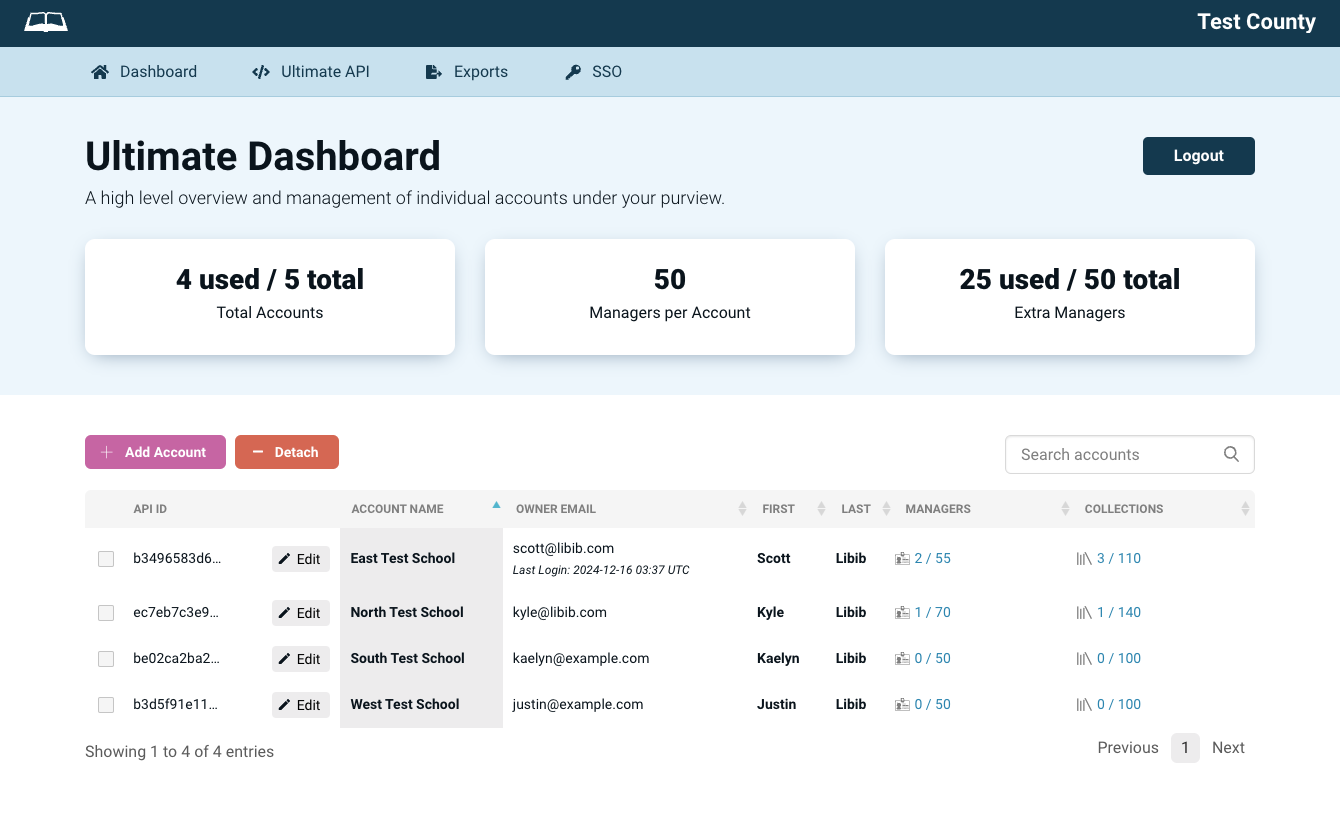
The Dashboard is the central hub of your Libib Ultimate account. From here you can manage every account in your collective, add or edit account owners, and drill into each account's collections and managers — all from one place.
At the top of the dashboard you'll see your usage at a glance: how many accounts you have filled out of your total, and how many extra managers you've assigned out of those available to you.
Add Account
Click Add Account to create a new account owner within your Ultimate collective. You'll provide:
- Account owner first & last name
- Account name (the organization or school name)
- Account owner email
- Password (optional — if left blank, a temporary password is generated)
- Published URL (optional — a custom alias for the account's public page)
- Extra managers (optional — drawn from your available extra manager pool)
Once created, the new account owner receives a welcome email with login instructions.
Existing Libib users
If the email already belongs to a free Libib account, that account is upgraded and added to your collective instead of creating a new one. An email that already belongs to a Pro account (or is already one of your accounts) cannot be added.
Edit Account
Select the Edit button on the account row to update its owner name, account name, email, published URL, password, or the number of extra managers assigned to it.
Reducing extra managers
You cannot reduce an account's extra managers below the number of managers currently in active use, or if the extra collections those managers provide are still in use.
Detach Account
Detaching an account downgrades the owner from an Ultimate-managed account back to a Basic Libib account. When an account is detached:
- All of its managers are removed and notified
- Any published libraries and kiosks are removed
- The account's API key is cleared
The account's items and collections remain, but Pro/Ultimate features are no longer available to it.
Manage Collections
Each account can hold up to 100 collections. Adding extra managers increases that limit — each additional manager adds 2 more collections (for example, 2 extra managers = 104 collections).
From an account's collections view you can:
- Add a new collection
- Publish or unpublish a collection on the owner's public page (assuming their public URL has been set)
- Delete a collection (this removes the collection along with its items)
Manage Managers
Every account can have managers assigned up to the number allotted to it. Ultimate managers use the same roles as Libib Pro — Admin, Manager, and Lender. See the Managers page for a full breakdown of what each role can do.
From this view you can:
- Add a manager (new or existing Libib user) and assign their role
- Assign collections to Manager and Lender roles
- Change a manager's role
- Remove a manager from the account
Newly added managers receive a welcome email with instructions on how to log in.