Search
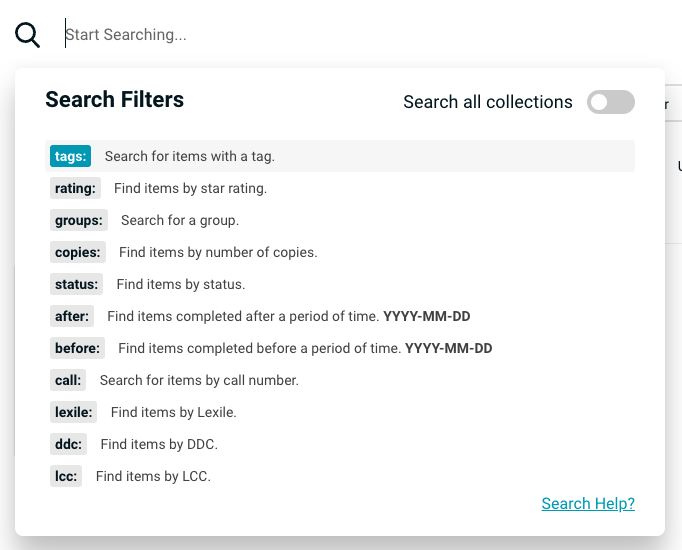
The search function examines titles, creators (authors, directors, designers, platforms, artists), descriptions, tags, notes, and groups. Advanced search options appear when clicking the search input field, allowing you to create sophisticated queries using specific operators. Results ranked by relevance, prioritizing titles and creators.
Search Operators
| Operator | Description | Example |
|---|---|---|
"..." | Exact phrase matching. Case-insensitive. | "the great gatsby" |
after: | Find items completed after a date, inclusive (format: YYYY-MM-DD) | after:2023-01-15 |
before: | Find items completed before a date, inclusive (format: YYYY-MM-DD) | before:2023-12-31 |
rating: | Filter by rating (1, 1.5, 2, 2.5, 3, 3.5, 4, 4.5, 5). Use rating:none for unrated items. | rating:4.5 |
tags: | Filter by tags. Use tags:none for untagged items. | tags:fiction |
status: | Filter by status (not begun, in progress, abandoned, completed). Use status:none for items with no status assigned. | status:completed |
copies: | Filter by number of copies. | copies:2 |
groups: | Filter by group name. Use groups:none for ungrouped items. | groups:twilight |
publisher: | Filter by publisher. Use publisher:none for items with no publisher. | publisher:tor |
| Filter within the "sweet spot" of a specific Lexile measurement. Returns books that are in the appropriate reading level. Using a 2 character Lexile code is also accepted. | lexile:800 | |
Call number can be searched in part order where each part is broken down by the dot separator. For example, a call number PZ.342.22 can be searched with call:PZ, call:PZ.342, or call:PZ.342.22 | call:PZ.342 | |
DDC number can be searched in part order where each part is broken down by the dot separator. For example, a ddc number 978.02 can be searched with ddc:978, or ddc:978.02 | ddc:978.02 | |
LCC number can be searched in part order where each part is broken down by the dot separator. For example, a lcc number PZ7.C6837 can be searched with lcc:PZ7, or lcc:PZ7.C6837 | lcc:PZ7.C6837 |
Search All Collections Pro
Pro users can search all collections at the same time by clicking Search all collections in the search dropdown menu. When this toggle is on, the tags list will automatically display all tags across all collections as well (managers will see all tags for all collections that they have access to).
Blue Indicator
When "Search all collections" is enabled, the magnifying glass icon turns blue.